
Download Svchost Process Analyzer – Process Identification, Suspicious Activity Detection, DLL Library Details
Overview
Svchost Process Analyzer is a specialized utility designed to assist users in monitoring and analyzing the Svchost.exe process, a critical component of the Windows operating system. This application helps users identify which services and applications are running under Svchost.exe, enabling a deeper understanding of system activity. The tool is particularly useful for detecting potentially malicious processes that may be masquerading as legitimate system components, which can indicate the presence of malware or unauthorized software. By providing visibility into these hidden processes, Svchost Process Analyzer empowers users to take informed actions regarding system security and stability.
Target users include both technical and non-technical individuals seeking to maintain a secure and optimized system. The app is ideal for users who suspect unusual system behavior, such as high CPU usage or unexpected network activity, and want to investigate whether Svchost.exe is involved. It also supports troubleshooting by highlighting processes that have encountered errors, helping users identify and resolve underlying issues. The developer did not provide additional technical details, but the app has been available since 2013, suggesting a long-standing presence in the system utility space.
Within the broader ecosystem of system maintenance tools, Svchost Process Analyzer fills a niche by offering focused, real-time analysis of a commonly misunderstood process. Its ability to detect suspicious activity and provide DLL metadata makes it a valuable asset for users committed to proactive system hygiene. Although the developer did not specify minimum OS requirements or platform compatibility, the app appears to be tailored for Windows environments, likely supporting modern versions of the OS.
Key Features & Functionality
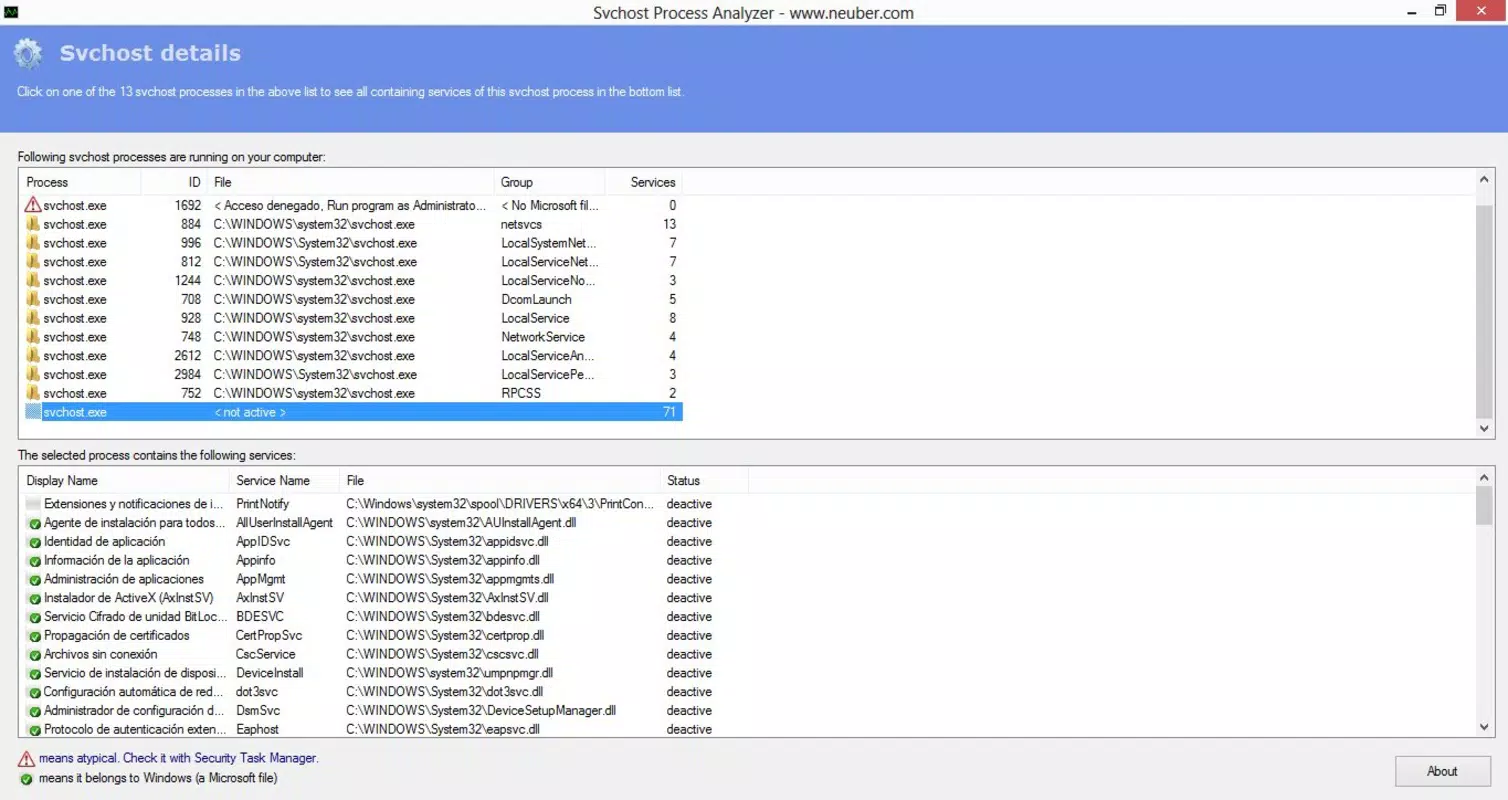
- Process Identification: The app efficiently identifies all processes associated with Svchost.exe, allowing users to see which services are currently active. This feature is essential for understanding what system components are running behind the scenes.
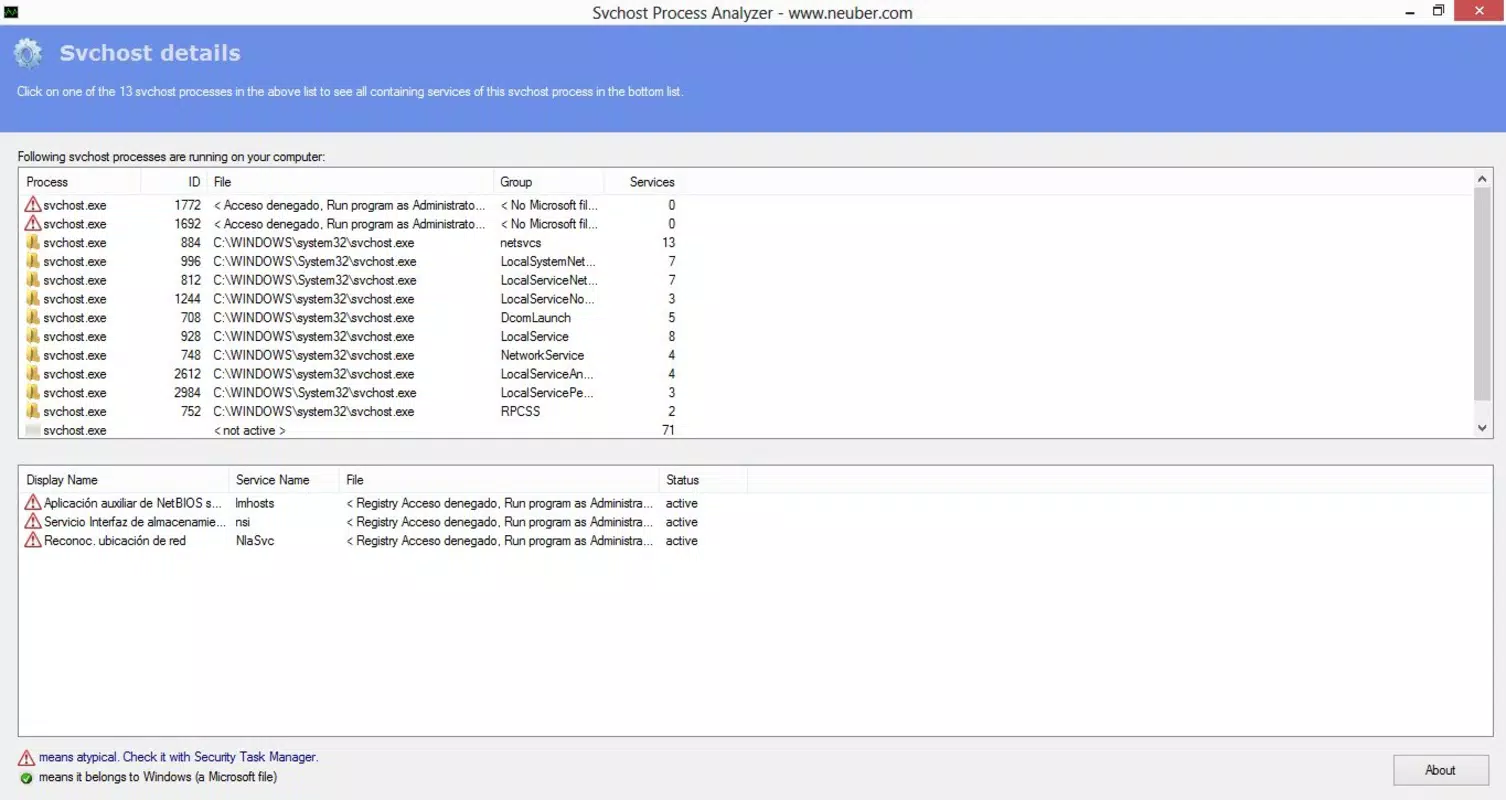
- Suspicious Activity Detection: Svchost Process Analyzer highlights processes that may be malicious or unauthorized. By flagging suspicious entries, users can quickly determine which applications may pose a security risk and take corrective action.
- Error Reporting: The utility provides a list of processes that have encountered errors, helping users pinpoint system instability or misconfigured services. This information guides troubleshooting and system repair efforts.
- DLL Library Details: Users can access detailed information about associated .dll files, including creation and modification dates. This functionality aids in tracing the origin of system issues and identifying when problems may have begun.
- User-Friendly Interface: Despite its technical focus, the app features an intuitive interface that simplifies navigation through complex system data. This makes it accessible to users with limited technical expertise.
For example, a user experiencing high CPU usage might run Svchost Process Analyzer to discover that a non-system service is consuming excessive resources. Similarly, someone concerned about malware could use the suspicious activity detection feature to identify a rogue process masquerading as a legitimate Windows service. The DLL metadata feature can help a technician determine when a system file was altered, offering valuable context during forensic analysis.
Interface, UX & Performance
The interface of Svchost Process Analyzer is designed with clarity and usability in mind. The layout presents process lists, status indicators, and metadata in a structured format, allowing users to scan through information efficiently. Visual cues such as color coding or icons likely help distinguish between trusted, suspicious, and error-prone processes, although specific design details were not provided.
Navigating through the app is straightforward, with logical menu flows that guide users from process overview to detailed inspection. The user-friendly interface supports both novice and experienced users, reducing the learning curve typically associated with system diagnostic tools. Although the developer did not list formal performance metrics, the app appears optimized for real-time analysis without significant system overhead.
Performance on different device categories remains unspecified, but the application is likely designed to function smoothly on standard desktop and laptop systems running Windows. Responsiveness and stability are critical for diagnostic tools, and based on its long-term availability, Svchost Process Analyzer appears to maintain reliable operation across various system configurations. The developer did not provide details on memory usage or CPU consumption, but the app’s focus on process analysis suggests efficient resource management.
Platform Compatibility & Technical Requirements
Svchost Process Analyzer is designed for Windows-based systems, though specific platform details were not disclosed. The developer did not specify the minimum operating system version required for installation or operation. Similarly, no information was provided regarding the app’s file size, though it is likely to be lightweight given its utility-focused nature.
Compatibility with different Windows versions, including Windows 10, 11, or older editions, remains unclear. The app was released on July 25, 2013, indicating it has been in use for over a decade. This longevity suggests it may support older systems, but users should verify compatibility with their specific setup before installation. The developer did not list any specific hardware requirements or dependencies.
Although the developer did not specify whether the app is available as a downloadable executable or requires administrative privileges, its functionality implies that it may need elevated permissions to access system processes and files. Users should ensure they are running the application with appropriate rights to access full diagnostic data.
Pros and Cons
Pros
- Provides detailed insight into Svchost.exe processes, enhancing system transparency.
- Includes suspicious activity detection to help identify potential malware.
- Offers error reporting for troubleshooting unstable services.
- Enables analysis of DLL file metadata, aiding in forensic investigations.
- Features a user-friendly interface suitable for non-technical users.
Cons
- Developer did not provide specific technical requirements or compatibility details.
- Information on file size and version history was not disclosed.
- No official update frequency or support timeline was mentioned.
- Platform availability beyond Windows was not confirmed.
- Specific performance metrics or resource usage data were not provided.
FAQ
Is Svchost Process Analyzer safe to use?
The app is designed to analyze system processes and does not modify system files. However, users should only download it from trusted sources to avoid potential security risks.
Can I use this app on Windows 10 or Windows 11?
While the developer did not specify compatibility, the app has been available since 2013 and may function on modern Windows versions. Users are advised to test it in a safe environment.
Does Svchost Process Analyzer require admin rights?
Given its access to system processes and files, the app likely requires elevated privileges. It is recommended to run it with administrative rights for full functionality.
How often should I update Svchost Process Analyzer?
The developer did not provide an update schedule. Users should check for updates manually if available through the official source.
Is the app available for Android or iOS?
Based on its functionality and release context, Svchost Process Analyzer is intended for Windows systems. There is no evidence of availability on mobile platforms.
Final Thoughts
Svchost Process Analyzer stands out as a focused and practical tool for users seeking greater visibility into their system’s core processes. Its ability to identify suspicious services, report errors, and analyze DLL files makes it a valuable addition to any system maintenance toolkit. While the lack of detailed technical specifications may raise questions about compatibility and performance, the app’s long-standing presence suggests reliability and stability.
It is particularly beneficial for users who want to proactively monitor system health, detect hidden threats, or troubleshoot performance issues. Whether you're a casual user concerned about security or a technician managing system integrity, this utility offers actionable insights without overwhelming complexity.
Download Svchost Process Analyzer now


